01Custom software
Casey's Linen Service Operations Management System
A connected operations system built around an Admin desktop app and a focused Dock tablet experience.
Project overview
One operational system, shaped for two different working environments
The Casey's Linen Service operations management system brings the movement of work into one connected product. Its visible workflow links Orders, Admin, Dock and Accounts while keeping the information for each stage close to the people responsible for it.
Rather than asking one interface to serve every environment, the system is presented through two purpose-specific surfaces. The Admin app gives office and operational users a broad desktop view; the Dock app is designed as a focused tablet experience for the handover point.
01The system
A clearer view of the operation
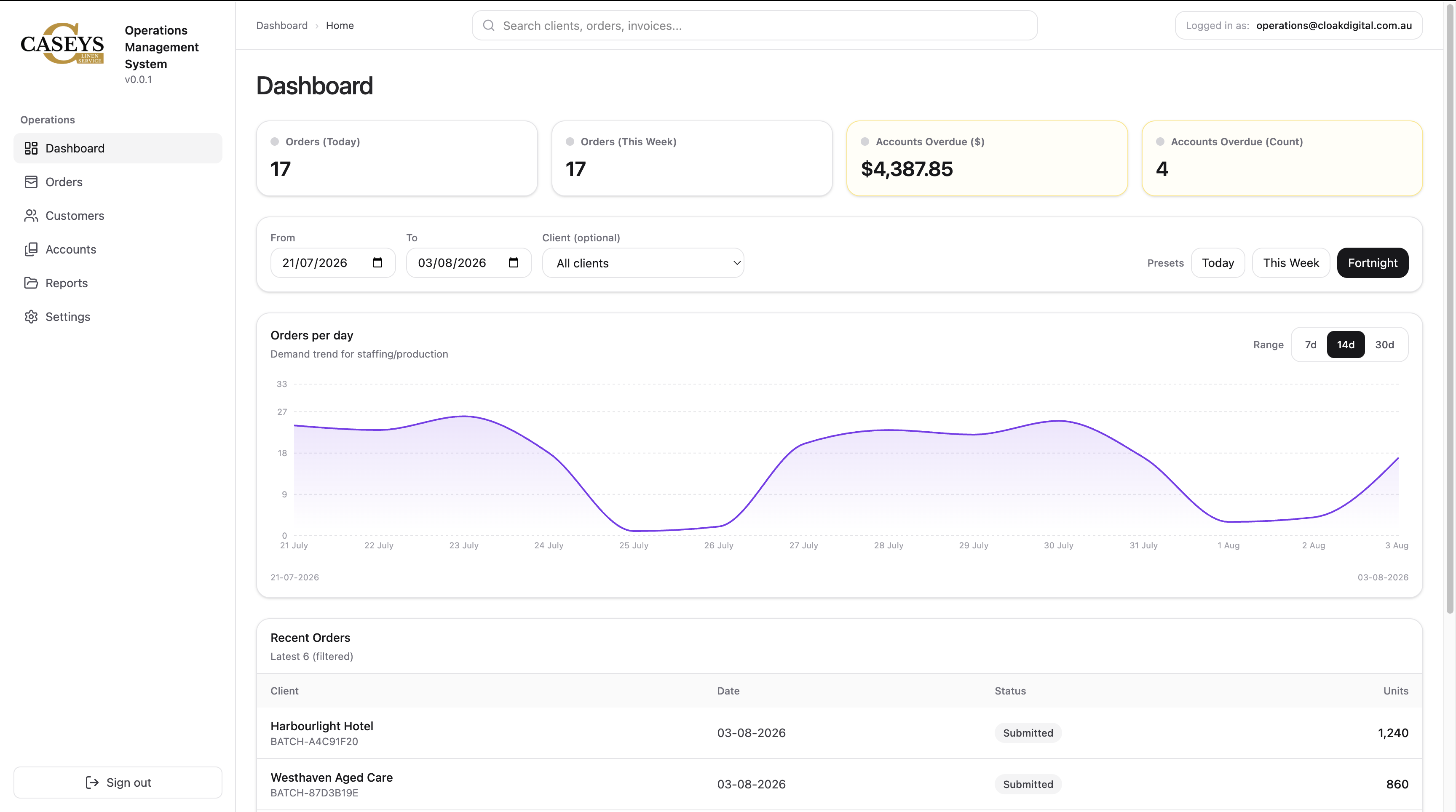
The approved Admin interface brings the main operational areas into a single navigation structure: dashboard, orders, customers, accounts, reports and settings. Search, filters and summary panels keep current work visible without forcing users to piece the picture together across separate screens.
The dashboard is not treated as a decorative overview. It establishes a working surface for finding records, reviewing activity and moving into the part of the operation that needs attention.
Orders
A defined area for reviewing and progressing order activity.
Customers
Customer information remains part of the same operational context.
Accounts
Account visibility sits alongside the work it relates to.
Reports
Operational information has a dedicated path for review.
02Interface strategy
Desktop depth, tablet focus
The Admin app and Dock app represent different moments in the same operation. The desktop interface has room for navigation, summaries, filters and detailed records. The tablet interface is intended for a more immediate environment where the handover needs to stay legible and direct.
Keeping those experiences distinct allows each surface to prioritise the context available at that point in the workflow. Their relationship comes from shared operational information, not from forcing identical screens onto different devices.
Replace with an approved tablet capture from the Dock application.
landscape asset slot · ready to replace03Workflow
Following the handover through
The project is presented around a simple operational sequence: Orders move into Admin, continue through Dock and remain connected to Accounts. That sequence gives the two applications a shared purpose and makes their relationship easier to understand.
A future approved walkthrough can document the exact states and responsibilities inside that sequence. The current case study keeps the workflow at the level established by the product showcase without inventing integrations, automations or process rules that have not been supplied.
Reserved for an approved screen recording showing a real handover through the system.
wide asset slot · ready to replace04Design system
Consistency where it supports confidence
Operational software needs to help users recognise where they are, what they are reviewing and what can happen next. The Admin surface uses a consistent navigation rail, restrained status treatments and familiar content patterns to create that continuity.
The Dock interface can extend the same product language while changing its density for tablet use. This gives the overall system a coherent identity without ignoring the practical difference between office administration and a dock-side handover.
The two interfaces are most useful when each one feels specific to its environment and unmistakably part of the same operation.
Project principle
Project scope
What the work covers
- 01Operations management system
- 02Admin desktop application
- 03Dock tablet application
- 04Operational dashboard
- 05Orders, customers and accounts views
- 06Connected workflow presentation